
Security
JetStream moves your files point-to-point between servers and connections you control, encrypted end to end. No third-party service sits in the middle, because there isn’t one.

Files move directly between servers and user connections you own. No third-party relay in the middle.
AES-256/GCM in flight, TLS 1.3 on the server connection, most secure settings on by default.
Authenticate against PAM, Active Directory or LDAP. Sandbox users to the paths you designate.
Password-protected, expiring links served from your own server, not a hosted service.
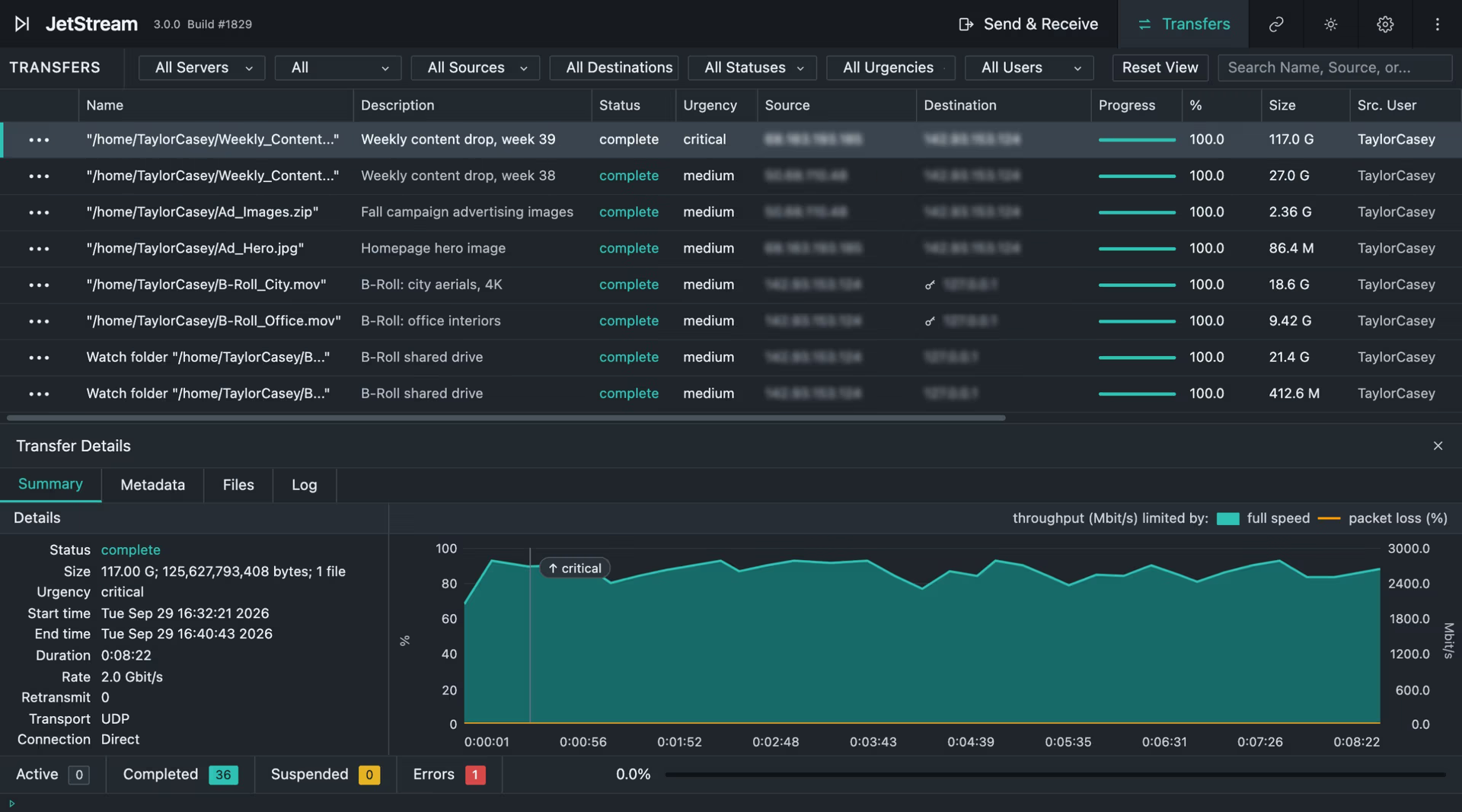
Transfer logs and activity history, held on your infrastructure with everything else.
Transfer logs and activity history give you a clear record of what moved, when, and between which endpoints.
Point-to-point control
Most secure file transfer services are someone else's cloud. Your file is uploaded to a vendor's infrastructure, held there while the recipient collects it, and deleted on a schedule you have to take on trust. Every security question that follows – where is it stored, who can reach it, which jurisdiction, how long, what happens at breach – exists because the file left your control.
JetStream removes the question rather than answering it. You deploy the server. Data moves directly between your systems and your recipients over an encrypted connection. No file lands on infrastructure JetStream operates, because JetStream doesn't operate any.
The practical consequence: the controls you already run – your network segmentation, your directory, your storage governance, your retention policy – apply to JetStream transfers, because the transfers happen inside them.
Transfer-level encryption
AES-256/GCM
Transfer level
TLS 1.3
Server connection
Every transfer is encrypted with AES-256/GCM at the transfer level. The server connection is protected with TLS 1.3. Together the security layer covers data confidentiality, data integrity, and packet replay protection.
Default settings are the most secure available. Nothing has to be switched on to be protected, and there is no configuration path that quietly downgrades a transfer.
Transfer integrity is verified with configurable MD5 checking, on the fly or by file, so a corrupted or truncated transfer is caught rather than delivered.
Access & identity
JetStream authenticates users against PAM, Active Directory, or LDAP. There is no separate user database to provision, deprovision, or audit. Access follows the identity system you already govern.
Beyond authentication:
Scope each user to specific paths and shares. A partner sees only what you designate.
Block file types from transferring entirely, at the server.
Shareable download links carry a password and an expiry date, set per link at the point of creation.
Transfers move between known, authenticated server and client connections rather than open endpoints.
Shareable links
The convenience of a download link usually comes with a hosted service behind it. JetStream's links are created and served by a server that ships as part of the 3.0 application and runs on your own infrastructure.
The recipient downloads in a browser with no software to install and no account to create. The file never leaves your network to get to them. Each link carries a password and an expiry date, and you decide how the link travels.
See how shareable links work →Deploy your way
Run JetStream Server in your own datacentre, in your own cloud account, or against Amazon S3. Data residency is whatever your infrastructure already is, which means the answer to "where does our data sit" doesn't change when you adopt JetStream.
✓ Your datacentre
✓ Your cloud account
For organizations under contractual restrictions on where client data may reside – pre-release media, client design IP, controlled technical data – this is usually the deciding factor rather than a feature.
Auditability
Transfer logs and activity history give a clear record of what moved, when, and between which endpoints. One-click diagnostics capture and download logs from inside the application, so an investigation doesn't require server access.
Logs stay on your infrastructure with everything else. There is no vendor-side audit trail to request, and none to be compromised.
Specifications
Transfer encryption
AES-256/GCM
Connection encryption
TLS 1.3
Security coverage
Confidentiality, data integrity, packet replay protection
Default posture
Most secure settings enabled by default
Integrity verification
Configurable MD5, on the fly or by file
Authentication
PAM, Active Directory, LDAP
Access scoping
Per-user directory sandboxing
Content controls
File type exclusion at the server
Link controls
Password and expiry date, per link
Deployment
On-premise, private cloud, Amazon S3
Vendor data access
None (no customer data reaches JetStream)
Audit
Transfer logs, activity history, one-click diagnostic capture
What is secure file transfer?
Secure file transfer moves files between parties with encryption protecting the data in transit and controls governing who can access it. Most secure file transfer services route files through a vendor's cloud. JetStream is deployed on your own servers instead, so files move point-to-point without passing through third-party infrastructure.
How does JetStream encrypt transfers?
Every transfer uses AES-256/GCM encryption at the transfer level, and the server connection is protected with TLS 1.3. The security layer covers data confidentiality, data integrity, and packet replay protection, and the most secure settings are enabled by default.
Does JetStream have access to our files?
No. JetStream is software you deploy on your own infrastructure. No customer data is transmitted to or stored by JetStream as a vendor, and there is no vendor-operated service in the transfer path.
How do you control who can access a transfer?
Users authenticate against PAM, Active Directory, or LDAP, so access follows the directory you already govern. Each user can be sandboxed to specific paths and shares, file types can be excluded at the server, and shareable download links carry a password and an expiry date set per link.
Where is our data stored?
Wherever you already store it. JetStream runs in your own datacentre, your own cloud account, or against Amazon S3. Adopting JetStream doesn't change your data residency, because no data moves to infrastructure JetStream operates.
Can we see a record of what was transferred?
Yes. Transfer logs and activity history record what moved, when, and between which endpoints. One-click diagnostics capture and export logs from inside the application, and all of it stays on your infrastructure.
We’re happy to walk your team through our architecture, deployment options, and data-handling practices. Reach out and we’ll route you to the right engineer.