Transfer Files
Transfer Files is part of Transfer Details.
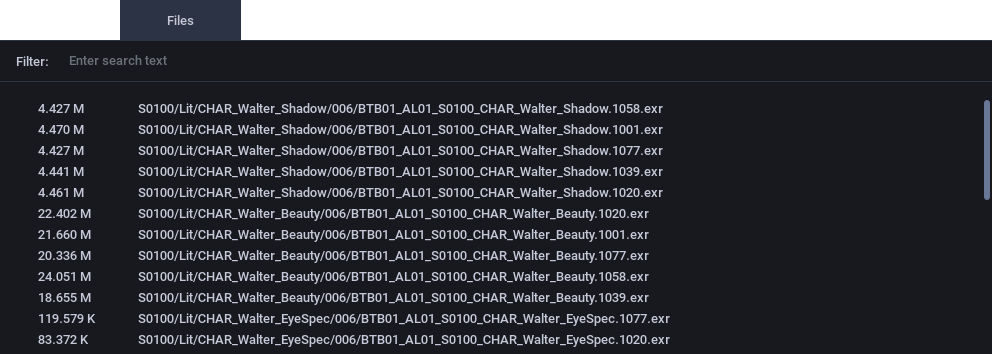
Filter
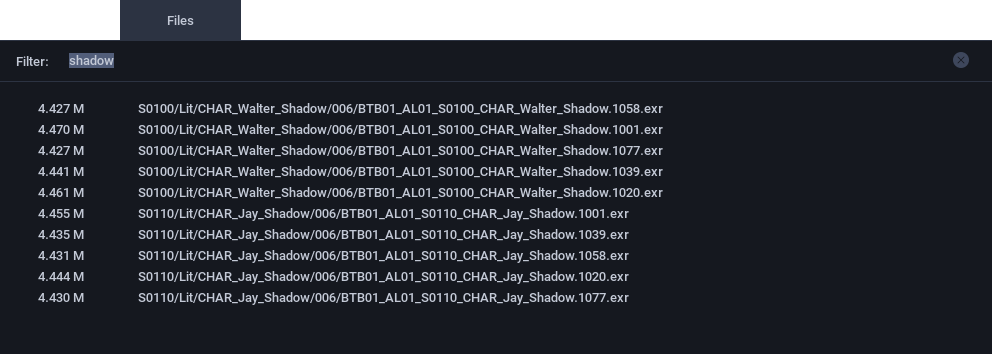
Directly above the file list is a filter input box. You can use this to quickly filter the list for items that match the text you enter.
Tip
The filter is case-insensitive.
Pattern matching (e.g. star, question mark or regular expressions) is not currently supported.
To quickly clear the filter, click the Ⓧ symbol to the right of the filter input box.
Clipboard
The Transfer Files list supports the clipboard copy operation. To copy items from the files list:
- Select one or more items in the files list. Press Control,⌘ + A to select all files.
- or press Control,⌘ + C.
The selected items will be copied to the clipboard. Columns are separated by a comma.
The following shows an example of the clipboard copied from a files list containing items similar to those illustrated above, after filtering by the frame 1058.
4.427 M, S0100/Lit/CHAR_Walter_Shadow/006/BTB01_AL01_S0100_CHAR_Walter_Shadow.1058.exr
24.051 M, S0100/Lit/CHAR_Walter_Beauty/006/BTB01_AL01_S0100_CHAR_Walter_Beauty.1058.exr
83.372 K, S0100/Lit/CHAR_Walter_EyeSpec/006/BTB01_AL01_S0100_CHAR_Walter_EyeSpec.1058.exr
8.167 M, S0110/Lit/CHAR_Jay_Beauty/006/BTB01_AL01_S0110_CHAR_Jay_Beauty.1058.exr
117.157 K, S0110/Lit/CHAR_Jay_EyeSpec/006/BTB01_AL01_S0110_CHAR_Jay_EyeSpec.1058.exr
4.431 M, S0110/Lit/CHAR_Jay_Shadow/006/BTB01_AL01_S0110_CHAR_Jay_Shadow.1058.exr